First Ride
20 credits. Choose your model, resolution and duration.
$9.90USD
20 credits
Upload a photo. Choose a scene. Get an 8- or 15-second talking video.
One clear photo of one cat or dog · JPG, PNG, WebP or AVIF · up to 4 MB · at least 300 px
Original English dialogue with a fictional character voice, not a real person's voice clone or an existing soundtrack.
20 credits

Your pet leans out of a white pickup parked by the pond and tells the visitor this spot is taken. One wave of the paw says the rest.

Your pet has claimed the best seat on the couch and isn't sharing. A short warning and a flick of the paw send the visitor on their way.
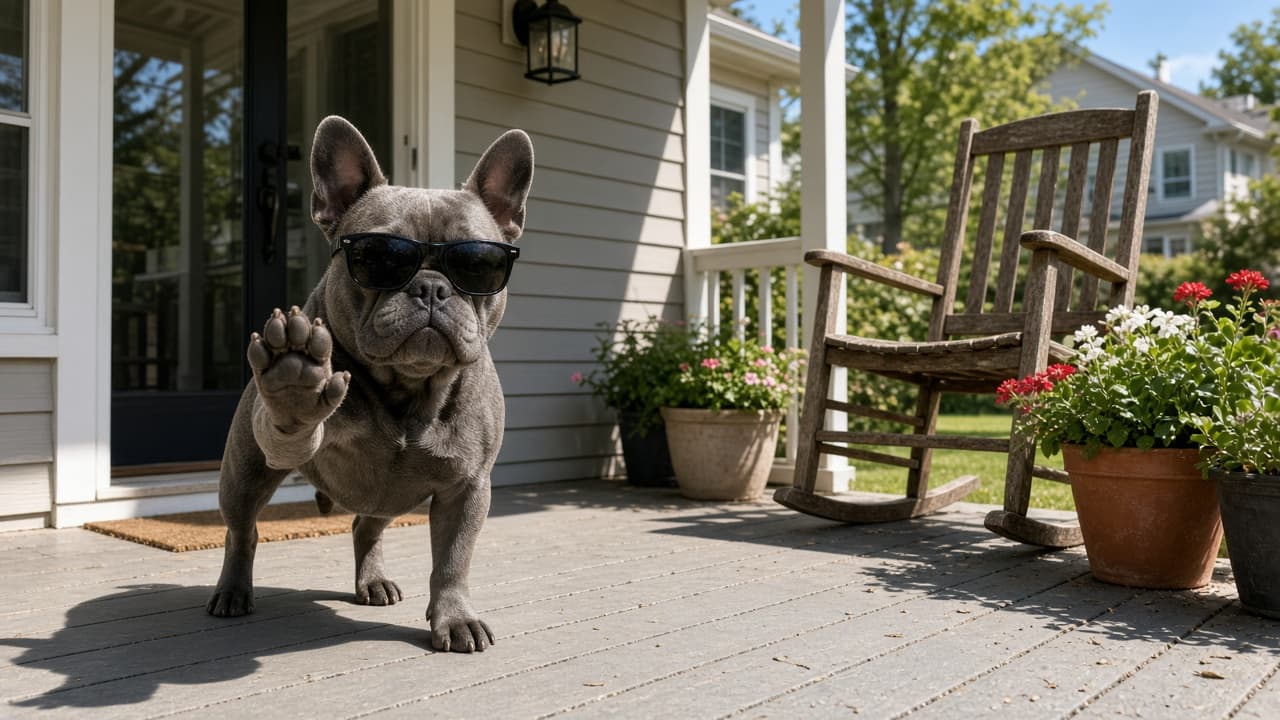
Your pet guards the front porch like it owns the place. A firm warning from the doormat and a point toward the street tell the visitor to keep walking.

Your pet takes the wheel of a parked golf cart and spots an unwelcome visitor. A quick word and a dismissive wave make it clear this ride isn't for sharing.
Create your clip
One photo. One character. One memorable send-off.
Upload a JPG, PNG, WebP or AVIF file up to 4 MB. Use one clearly visible pet, with its face in focus and its head and upper body in view.
Choose Pond Pickup, Couch Spot, Front Porch or Golf Cart. Each scene includes a prompt for your pet's English send-off, gestures and closing shot.
Select Standard or Pro, 480p or 720p, and 8 or 15 seconds. The default is Standard, 720p, 8 seconds. Review the credit cost, sign in and confirm that you have permission to use the photo before submitting. When the clip completes, watch it with sound or download it from My Videos.
Pricing
Buy one-time credits and choose the model, resolution and duration for each clip. No free trial, subscription or automatic renewal.
20 credits. Choose your model, resolution and duration.
20 credits
60 credits. Choose your model, resolution and duration.
60 credits
100 credits. Choose your model, resolution and duration.
100 credits
Each video's credit cost depends on the selected model, resolution and duration. Mix available specifications within your balance; review the cost before generating.
Credits never expire.
Failed generations are never charged - credits go straight back to your balance.
Choose Standard or Pro, 480p or 720p, and 8 or 15 seconds. All options request a vertical 9:16 video with original English dialogue and no watermark. The generator shows the selected cost before you confirm.
| Model | Resolution | 8 seconds | 15 seconds |
|---|---|---|---|
| Standard Seedance 2.0 Mini | 480p | 10 credits | 20 credits |
| Standard Seedance 2.0 Mini | 720p | 20 credits | 40 credits |
| Pro Seedance 2.0 | 480p | 20 credits | 40 credits |
| Pro Seedance 2.0 | 720p | 40 credits | 80 credits |
Prices in USD. Each pack is a separate one-time purchase with no automatic renewal. Purchased credits never expire. You can mix available models, resolutions and durations within your balance. For the same model and resolution, 15 seconds costs twice as many credits as 8 seconds. Errors, timeouts and safety-filter rejections return the affected credits; a completed result you do not like is not a failed generation.
FAQ
Videos are generated with the Seedance video model.
It is a single-photo AI tool that requests an 8- or 15-second talking send-off video of your pet. Choose Pond Pickup, Couch Spot, Front Porch or Golf Cart. The prompt asks your pet to claim their spot and gesture for an unseen visitor to leave.
Yes. Choose your scene and upload one animal with its face clearly visible. AI can change details or interpret the gesture differently, so the photo guide is preparation advice rather than a guarantee.
The prompt asks the character to tell an off-camera visitor, in English, that this is their spot and the visitor should leave. The model creates the lines and a fictional voice; it does not copy an existing recording or clone someone's voice. Wording, delivery and mouth movement vary between generations.
No. No free trial. A one-time credit pack is required to generate a video. A clip costs For 8 / 15 seconds respectively, Standard costs 10 / 20 credits at 480p and 20 / 40 at 720p; Pro costs 20 / 40 credits at 480p and 40 / 80 at 720p. 20 credits for $9.90; 60 credits for $19.90; 100 credits for $29.90. There are no sign-up credits or subscriptions.
Standard uses Seedance Mini; Pro uses Seedance 2.0. Both offer 480p or 720p and 8 or 15 seconds, with original English dialogue in vertical 9:16 format. For 8 / 15 seconds respectively, Standard costs 10 / 20 credits at 480p and 20 / 40 at 720p; Pro costs 20 / 40 credits at 480p and 40 / 80 at 720p. Pro is not a promise that you will prefer every individual result.
20 credits for $9.90; 60 credits for $19.90; 100 credits for $29.90. Each video's credit cost depends on the selected model, resolution and duration. You can mix specifications within your balance; the pricing table, generator and confirmation show the applicable cost.
Eight seconds uses a concise scene prompt with shorter English dialogue, a dismissive gesture and the closing shot. Fifteen seconds uses the full scene sequence. The model is asked to generate the selected duration; an 8-second request is not a 15-second video trimmed afterward. For the same model and resolution, 15 seconds costs twice as many credits as 8 seconds.
The 8-second video is an owner-supplied illustrative clip, not proof of a result generated by this site. Scene previews are still images, not finished videos made from an uploaded photo.
Generation time varies. Eight or fifteen seconds is your selected video length, not a processing-time promise. The page shows request status while processing. If a request is still being confirmed, check its status rather than immediately submitting another one.
No. The tool generates a new scene from your uploaded photo. It does not copy frames, recorded voices or soundtracks from existing clips.
Failed generations automatically return their credits. Within 7 days of purchase, unused credits can be refunded at that pack's per-credit price. Contact us to request a refund; see the Refund Policy for details. A completed clip with a gesture or likeness you do not prefer is not the same as a failed generation.